Imagens
Google Flow
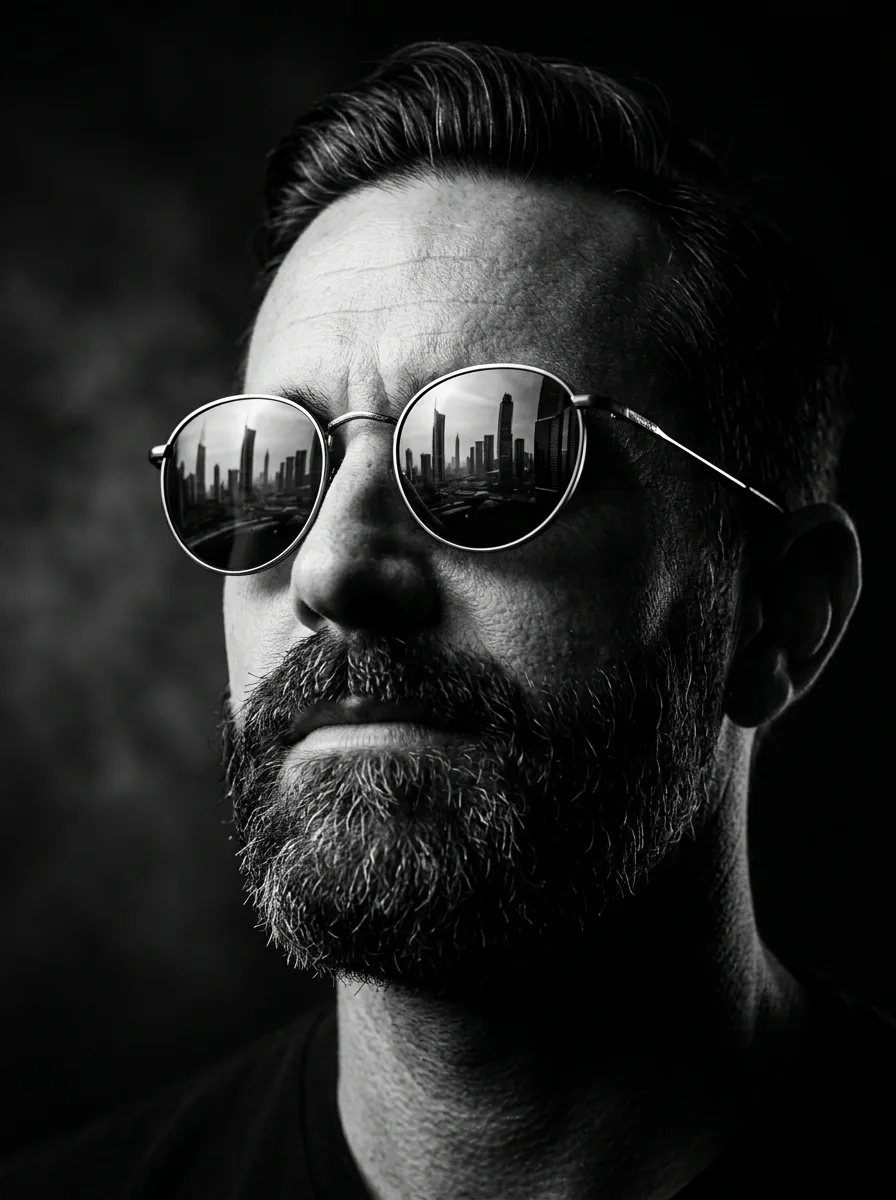
Retrato Cinematográfico Preto e Branco com Reflexo Urbano
Transforme sua foto em um retrato cinematográfico ultra realista em preto e branco, com iluminação dramática, óculos refletindo uma metrópole moderna e visual digno de pôster de filme.
88Visualizações
6Cópias
Informações
- Ferramenta
- Google Flow
- Categoria
- Imagens
- Necessita foto
- Sim
- Dificuldade
- Fácil
- Tempo estimado
- 15 Segundos
- Última atualização
- 21/09/2026
Prompt completo
Create a hyper-realistic cinematic portrait using the uploaded photo as the reference.

Preserve the person's facial identity exactly as in the original image, including facial proportions, skin details, beard, hairstyle, expression, and overall likeness.

Generate a dramatic black-and-white close-up portrait with premium editorial photography quality. The subject is looking slightly upward with a confident and visionary expression.

Apply strong directional side lighting that creates deep shadows and striking highlights across the face, emphasizing texture, depth, and character. The lighting should resemble a luxury magazine cover or blockbuster movie poster.

The subject is wearing elegant round sunglasses with highly detailed reflections of a futuristic metropolitan skyline, including skyscrapers, city lights, and architectural details visible in the lenses.

Use a completely dark minimalist background to isolate the subject and create a mysterious atmosphere. Add subtle cinematic haze, realistic contrast, and professional studio-quality image processing.

Ultra-detailed skin texture, realistic beard and hair rendering, sharp focus on the face, dramatic composition, luxury fashion photography style, high-end cinematic mood, masterpiece quality, ultra-realistic, 8K resolution.

Maintain the exact appearance of the uploaded person.
Complemente seu fluxo de trabalho
Placa de Vídeo Asus GeForce RTX 5070 Prime OC Edition 12GB GDDR7 192-bit
Ver Preço ↗
Inteligência artificial em marketing e vendas: Um guia para gestores de pequenas, médias e grandes empresas - Editora Alta Books
Ver Preço ↗
Mouse Sem Fio Recarregável Wireles Optico Ergonômico
Ver Preço ↗
Destaque
Notebook Asus Vivobook 15 M1502ya Amd Ryzen 7 5825u 16gb Ram 512gb Ssd Windows 11 Home Tela 15.6 Led Fhd Silver - Nj655w
Ver Preço ↗
Inteligência Artificial Ampliada
Ver Preço ↗
Este espaço contém links de afiliado. Ao comprar através deles, o PromptPronto pode receber uma comissão, sem custo adicional para você!
O que este prompt faz?
Transforma qualquer foto em um retrato artístico cinematográfico de alto impacto visual, criando um visual sofisticado, misterioso e profissional, com iluminação dramática e reflexos urbanos realistas nos óculos, mantendo a identidade original da pessoa.
Como usar
1. Abra Google Flow ↗.
2.
Envie uma foto nítida da pessoa.
3.
Preferencialmente utilize uma imagem frontal ou levemente inclinada.
4.
Cole o prompt no Gemini Flow.
5.
Anexe a foto quando solicitado.
6.
Gere a imagem e ajuste apenas se desejar mudar o estilo dos óculos ou da cidade refletida.
2.
Envie uma foto nítida da pessoa.
3.
Preferencialmente utilize uma imagem frontal ou levemente inclinada.
4.
Cole o prompt no Gemini Flow.
5.
Anexe a foto quando solicitado.
6.
Gere a imagem e ajuste apenas se desejar mudar o estilo dos óculos ou da cidade refletida.
Exemplo de resultado
Foto enviada: Homem com barba.
Resultado:
Retrato em preto e branco ultra realista.
Iluminação lateral cinematográfica.
Óculos redondos elegantes.
Reflexo de arranha-céus modernos nas lentes.
Fundo totalmente escuro.
Aparência de capa de revista premium ou pôster de filme.
Resultado:
Retrato em preto e branco ultra realista.
Iluminação lateral cinematográfica.
Óculos redondos elegantes.
Reflexo de arranha-céus modernos nas lentes.
Fundo totalmente escuro.
Aparência de capa de revista premium ou pôster de filme.